
Introduction
For apparel brands and clothing startups evaluating different printing methods, one of the most common questions is: how long does DTG printing take per shirt? Understanding the real production speed of Direct-to-Garment (DTG) printing is essential when planning product launches, estimating manufacturing timelines, or choosing between printing technologies such as DTG and screen printing.
To better understand how production time interacts with fabric selection, cost structure, and printing methods, it is useful to review a broader DTG production framework.
While DTG is often described as a fast and flexible printing method, the actual production time per shirt includes more than just the printing stage. In a professional apparel manufacturing environment, garments typically go through several steps, including fabric preparation, pretreatment application, printing, and heat curing. Each stage contributes to the total cycle time and ultimately determines how many shirts can be produced in a given period.
For sourcing teams and brand owners, understanding these operational details helps set realistic expectations for production throughput and order planning. This guide explains the typical DTG printing time per shirt, the full production workflow, and the key factors that influence printing speed, helping apparel brands make informed manufacturing decisions.
What Is the Average DTG Printing Time Per Shirt?
Understanding the average DTG printing time per shirt requires looking beyond the moment the printer starts applying ink. In real apparel production environments, DTG printing is part of a workflow that includes garment preparation, pretreatment, printing, and heat curing. Each stage contributes to the total cycle time required to produce a finished garment.
For most standard DTG production setups, the actual printing stage typically takes between 1 and 4 minutes per shirt, depending on artwork complexity, ink coverage, and garment color. However, when preparation and curing processes are included, the total production time per shirt generally ranges from 4 to 8 minutes.
This range represents a realistic estimate used by many garment manufacturers when planning DTG production capacity and order scheduling.
Typical DTG Printing Time Range
The time required for the printing stage varies primarily based on the size of the design and the amount of ink required. Smaller designs with light ink coverage can be printed relatively quickly, while larger graphics require more passes from the print head.
Typical printing times include:
- Small or light designs: about 1–2 minutes
- Medium-sized full-color designs: around 2–3 minutes
- Large or high-coverage prints: approximately 3–4 minutes
Designs that include gradients, photographic images, or high detail often require additional ink passes, which increases the total print duration.
Total Production Time Per Shirt (Including Preparation)
In professional production workflows, DTG printing involves multiple steps before and after the actual printing stage. These steps ensure proper ink adhesion, color quality, and wash durability.
A typical production timeline per garment may look like this:
- Garment preparation and positioning: 15–30 seconds
- Pretreatment application: 20–40 seconds
- Pretreatment drying: 30–90 seconds
- DTG printing: 2–4 minutes
- Heat curing: 2–3 minutes
When these steps are combined, the complete production cycle typically falls between 4 and 8 minutes per shirt. This cycle time is the figure manufacturers use when estimating DTG production capacity and determining realistic lead times for custom apparel orders.
Step-by-Step DTG Production Process in Apparel Manufacturing
To understand DTG printing time per shirt, it is important to look at the entire production workflow rather than focusing only on the printing stage. In a professional garment manufacturing environment, each shirt typically passes through several controlled steps to ensure color accuracy, ink adhesion, and long-term wash durability.
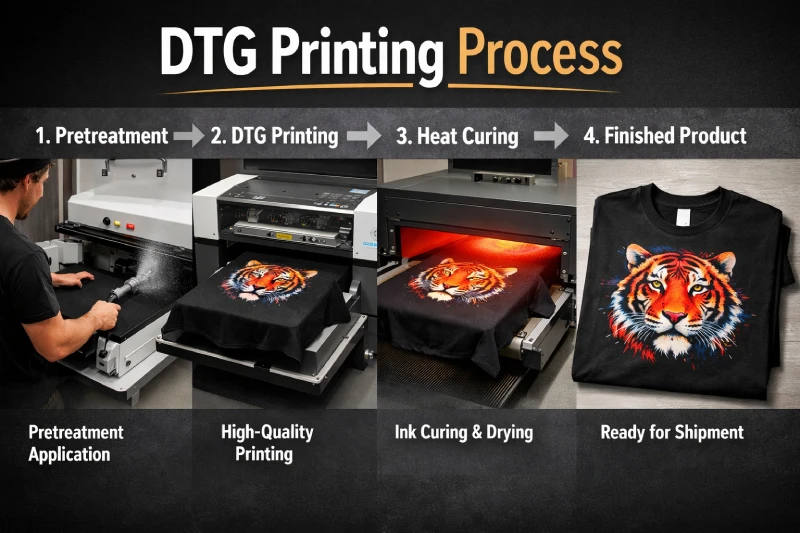
Although the actual printing stage may take only a few minutes, the surrounding preparation and curing processes contribute significantly to the overall cycle time. When combined, these steps create the realistic 4–8 minute production window per garment that many DTG production facilities operate within.
Understanding these stages also helps apparel brands evaluate how DTG printing fits into their production planning.
Garment Preparation
Before printing begins, the garment must be prepared and properly positioned on the printer platen. This step ensures that the fabric surface is smooth and free of debris that could interfere with ink application.
Typical preparation steps include:
- Removing lint using a roller or air blower
- Aligning the garment on the platen
- Ensuring the fabric is flat and tensioned correctly
Proper positioning is important for print accuracy, especially for centered chest prints or large artwork placements.
Typical time required: 15–30 seconds per shirt
Pretreatment Application
Pretreatment is a critical step in DTG printing, particularly when printing on dark garments or fabrics requiring white ink. A liquid pretreatment solution is sprayed onto the fabric to prepare the fibers for ink bonding.
The pretreatment layer helps:
- improve color vibrancy
- allow white ink to adhere properly
- prevent ink from spreading into the fabric fibers
In professional production settings, pretreatment may be applied using either manual spray units or automated pretreatment machines.
Typical time required: 20–40 seconds per shirt
Pretreatment Drying
After pretreatment is applied, the garment must be dried before entering the printer. This ensures the solution is evenly absorbed into the fabric and prevents moisture from affecting ink placement.
Drying can be performed using:
- a heat press
- a conveyor dryer
- specialized pretreatment drying equipment
This stage stabilizes the garment surface and prepares it for accurate ink deposition.
Typical time required: 30–90 seconds
DTG Printing Stage
The printing stage is where the DTG printer deposits ink directly onto the garment using an inkjet printing process. The print head moves across the fabric, applying layers of CMYK ink and, when required, a white ink base layer.
Printing speed depends on several factors, including:
- artwork size
- ink density
- garment color
- printer resolution settings
For most standard designs used in apparel branding, the printing stage generally takes: 2–4 minutes per shirt
Large prints with heavy ink coverage may take slightly longer.
Final Heat Curing
Once printing is complete, the garment must go through a curing process to permanently bond the ink to the fabric. Without proper curing, the print may fade, crack, or wash out.
Heat curing is typically performed using:
- a heat press
- a conveyor dryer
The curing stage ensures the printed design achieves the durability expected in finished apparel products.
Typical curing time: 2–3 minutes
When these steps are combined, the DTG workflow becomes clear: the printing stage itself is only one part of a broader manufacturing process. For apparel brands planning production timelines, understanding this full workflow provides a more accurate view of DTG production speed and capacity.
Key Factors That Affect DTG Printing Speed
Although the average DTG printing time per shirt typically falls within a predictable range, actual production speed can vary significantly depending on several technical and operational factors. In apparel manufacturing environments, these variables influence both the printing duration and the overall throughput of a DTG production line.
For apparel brands and sourcing teams, understanding these factors helps explain why two orders with the same quantity may have different production timelines.
Artwork Size and Ink Coverage
One of the most important factors affecting DTG printing speed is the size and complexity of the artwork being printed. Larger graphics require the printer’s print head to travel across a wider area, depositing more layers of ink.
Designs with high ink density—such as photographic images, gradients, or large solid color areas—typically require multiple passes to achieve accurate color reproduction. As a result, printing time increases as the amount of ink coverage grows.
For example:
- Small chest logos generally print faster
- Large front graphics take longer
- Full-shirt artwork requires the most printing time
This is why artwork design directly impacts the production time per shirt in DTG workflows.
Light vs Dark Garments
Garment color also plays a major role in DTG printing speed. Printing on light-colored shirts is generally faster because the printer can apply CMYK inks directly to the fabric.
However, dark garments require an additional white ink base layer before the colored inks are applied. This white underbase acts as a foundation that allows colors to appear vibrant on dark fabrics.
Because this process involves extra ink passes, printing on dark garments often increases the printing time by 40–70% compared to light-colored shirts.
As a result, DTG production planning often considers garment color when estimating total printing time.
Fabric Type
The fabric composition of the garment also affects printing efficiency and workflow stability. DTG printing performs best on 100% cotton fabrics, where the ink bonds easily with the fibers.
Other materials may require adjustments in pretreatment or curing processes.
Typical fabric considerations include:
- 100% cotton: fastest and most consistent DTG results
- cotton blends: moderate performance depending on blend ratio
- polyester fabrics: may require specialized inks or treatments
Because different fabrics interact with ink differently, they can influence both print quality and the time required for preparation and curing.
Printer Workflow Setup
Production speed is also influenced by how the DTG equipment is integrated into the overall workflow. In many apparel production environments, the printer itself is only one part of a larger system.
Operational factors that impact speed include:
- number of printer platens in use
- operator experience and workflow coordination
- garment loading and unloading efficiency
- curing equipment capacity
Well-organized DTG facilities often implement multi-station workflows to reduce idle time between prints. By preparing garments while another shirt is printing, operators can improve overall throughput and maintain a steady production rhythm.
Understanding these variables helps apparel brands better interpret DTG printing speed estimates and plan realistic production timelines for custom apparel orders.
DTG Printing Time vs Screen Printing Production Speed
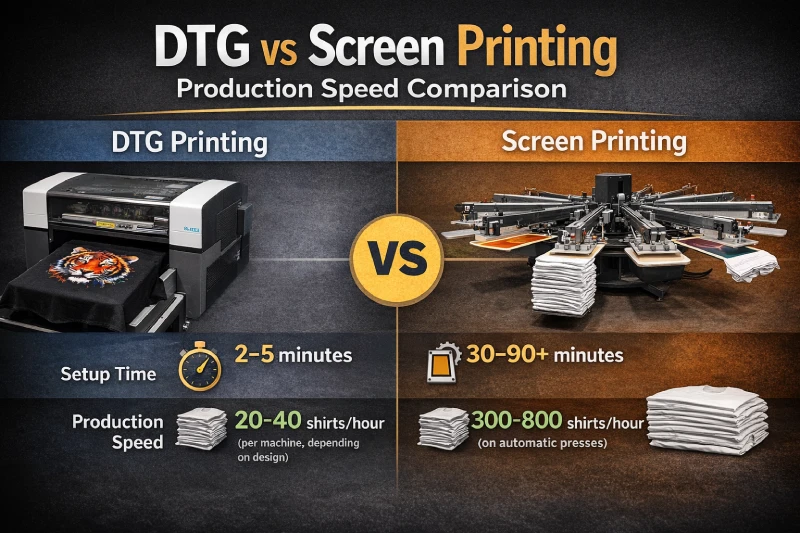
When evaluating apparel printing methods, many brands compare DTG printing speed with screen printing production efficiency. Both technologies are widely used in garment manufacturing, but they are optimized for different production scenarios.
DTG printing prioritizes flexibility and design complexity, while screen printing is designed for high-volume production with consistent artwork. Understanding the differences in setup time and production throughput helps apparel brands choose the most suitable printing method for their order size and product strategy.
Setup Time Comparison
One of the key advantages of DTG printing is its minimal setup requirement. Because DTG operates similarly to a digital printer, artwork can be sent directly from a computer to the machine without physical preparation.
This means DTG printing typically requires:
- no screen preparation
- no ink mixing for each color
- minimal machine setup
As a result, DTG production can begin almost immediately after the design file is prepared.
In contrast, screen printing requires several setup steps before production begins, including:
- creating screens for each color in the design
- coating and exposing the screens
- aligning screens on the press
- preparing inks and adjusting registration
Depending on the complexity of the design, screen printing setup can take 30 to 90 minutes or longer before the first shirt is printed.
For small runs or multiple design variations, this setup time can significantly impact production efficiency.
Printing Speed Comparison
Once setup is complete, screen printing typically achieves much higher production speeds than DTG printing. Industrial screen printing presses are designed for continuous, repetitive production and can produce a large number of garments within a short period.
Typical screen printing throughput may reach:
- 300–800 shirts per hour on automatic presses
By comparison, DTG printing focuses on individual garment printing. Because each shirt must go through the digital printing process separately, throughput is naturally lower.
Typical DTG production capacity per machine is approximately:
- 20–40 shirts per hour, depending on artwork size and garment color
This difference explains why screen printing is often preferred for large-volume orders with simple designs, while DTG printing is commonly used for smaller runs, complex artwork, and on-demand production models.
For apparel brands planning production, the choice between these methods often depends on order quantity, design complexity, and required turnaround time.
DTG Production Throughput in Bulk Orders
While DTG printing is often associated with small-batch production, many apparel manufacturers use it successfully for moderate-volume orders. To understand how DTG performs in larger runs, it is important to evaluate production throughput rather than just the printing time per shirt.
Throughput refers to the number of garments that can be completed within a specific time period, typically measured per hour or per day. Because DTG prints garments individually, production capacity depends on both machine performance and workflow efficiency.
Typical DTG Daily Output
In a standard production setup, a single DTG printer can usually produce 25–40 shirts per hour, depending on design size, garment color, and operator workflow.
Based on this hourly capacity, a typical daily output for one printer may be:
- 200–300 shirts per production day
This estimate assumes a consistent workflow where garments are prepared, printed, and cured continuously without major interruptions.
However, production output can vary depending on several factors, including:
- complexity of the artwork
- proportion of dark garments requiring white ink
- curing equipment capacity
- operator efficiency
These variables influence the real throughput that manufacturers can maintain throughout a production shift.
Scaling DTG Production
When apparel brands place larger DTG orders, manufacturers typically increase capacity by scaling the production setup rather than relying on a single printer.
Common scaling strategies include:
- operating multiple DTG printers simultaneously
- organizing batch-based garment preparation
- using conveyor dryers for continuous curing
- separating pretreatment, printing, and curing stations
By distributing these tasks across several operators and machines, production facilities can significantly increase overall throughput while maintaining print quality.
In this type of workflow, DTG printing becomes part of a coordinated production line where different stages occur simultaneously. This approach allows apparel manufacturers to handle mid-sized bulk orders while maintaining the flexibility that DTG printing provides.
How Apparel Brands Should Plan DTG Production
For apparel brands, understanding DTG printing time per shirt is only part of the production planning process. The more important question is how DTG printing fits into a broader manufacturing schedule that includes order preparation, printing workflow, curing, quality inspection, and shipping.
Because DTG printing operates on an individual-garment basis, production planning must consider both printing capacity and total order volume. Brands that understand these operational constraints can set more realistic expectations for lead times and production scheduling.
Ideal Order Size for DTG
DTG printing performs best in production scenarios where flexibility and design complexity are more important than mass throughput. This makes it particularly suitable for apparel brands producing smaller runs or designs with multiple variations.
Common DTG use cases include:
- small batch production for new product launches
- limited edition collections
- e-commerce brands testing new designs
- customized or personalized garments
- sample production before bulk manufacturing
Because DTG does not require screens or color separation, brands can print multiple design variations without additional setup costs. This makes DTG especially valuable for brands operating with frequent design updates or diverse product catalogs.
Lead Time Planning
When planning DTG production, brands should also account for factors beyond the printing stage itself. Production timelines typically include several operational steps that occur before and after printing.
Typical production planning considerations include:
- order preparation and garment allocation
- pretreatment and printing workflow capacity
- curing and finishing processes
- quality inspection and packaging
- logistics and shipping timelines
Even though DTG printing offers quick setup and flexible production, realistic lead times still depend on order quantity and production capacity. For example, a moderate order of several hundred shirts may require multiple production days depending on the number of printers available.
By considering these factors early in the planning stage, apparel brands can align their product launch schedules with the actual capabilities of DTG production systems.
When DTG Printing Is the Right Choice for Apparel Brands
DTG printing is not designed to replace every garment printing method. Instead, it excels in production situations where design flexibility, short setup time, and detailed artwork are more important than maximum output speed. For many apparel brands—especially those operating in fast-moving fashion or e-commerce environments—DTG provides a practical solution for launching and testing new products.
Understanding when DTG printing is the right choice helps brands align their design strategy, order size, and production timeline with the capabilities of the printing process.
Ideal for Detailed and Full-Color Designs
One of the main advantages of DTG printing is its ability to reproduce high-resolution artwork and complex color gradients directly on fabric. Unlike traditional printing methods that rely on separate color layers, DTG applies ink digitally, allowing for highly detailed graphics without additional setup.
This makes DTG particularly suitable for designs such as:
- photographic prints
- gradient color artwork
- multi-color illustrations
- complex graphic designs with fine details
Because the design is printed directly from a digital file, DTG can reproduce intricate artwork without the preparation steps required in other printing methods.
Effective for Small Batch Production
DTG printing is also well suited for low-to-medium order quantities, where traditional printing methods may become inefficient due to setup requirements. For apparel brands producing limited collections or testing new designs, DTG allows garments to be printed quickly without committing to large minimum quantities.
Typical DTG-friendly production scenarios include:
- small product launches
- seasonal capsule collections
- online store inventory testing
- print-on-demand business models
By eliminating screen preparation and allowing rapid design changes, DTG printing enables apparel brands to maintain flexible production cycles while responding quickly to market demand.
Key Limitations of DTG Production Speed
Although DTG printing offers flexibility and fast setup, it also has natural limitations in terms of production speed and scalability. Understanding these constraints helps apparel brands determine whether DTG is the most efficient method for a particular order size or production strategy.
In most garment manufacturing environments, DTG is optimized for design versatility and short production runs, rather than extremely high-volume output. When production requirements exceed certain thresholds, other printing technologies may provide better efficiency.
Slower for Large-Volume Orders
Because DTG printing processes garments individually, the production speed is limited by the time required to complete each printing cycle. Even with optimized workflows, each shirt must go through the same preparation, printing, and curing stages.
As order quantities increase, the cumulative printing time can become significant. For example, printing several hundred garments may require multiple machines or extended production schedules.
In contrast, screen printing becomes more efficient once setup is complete. Automated screen printing presses can print hundreds of garments per hour, making them more suitable for very large orders with simple or repetitive designs.
For this reason, manufacturers often recommend:
- DTG printing for small to medium orders
- screen printing for large-volume production
Choosing the appropriate printing method helps ensure that production timelines remain efficient.
Ink Management and Maintenance Requirements
Another factor affecting DTG production reliability is the maintenance required to keep the printing system operating consistently. DTG printers rely on specialized inks—particularly white ink systems—which require controlled operating conditions.
To maintain stable production quality, DTG systems typically require:
- regular print head cleaning
- consistent humidity and temperature control
- proper ink circulation and agitation
If these conditions are not maintained, issues such as nozzle clogging or uneven ink flow can occur, which may slow down production or require maintenance downtime.
While these operational considerations are manageable in professional production environments, they highlight why DTG printing systems require careful workflow management to maintain consistent production speed.
Conclusion
For apparel brands evaluating different garment printing methods, understanding the DTG printing time per shirt provides important insight into production planning and manufacturing efficiency. While the actual printing stage may take only a few minutes, the complete workflow—including pretreatment, printing, and curing—typically results in a total production cycle of around 4 to 8 minutes per shirt.
This cycle time makes DTG printing highly effective for production scenarios that prioritize design flexibility, fast setup, and smaller order quantities. Apparel brands launching new designs, producing limited collections, or operating on-demand business models often benefit from the adaptability that DTG printing offers.
However, DTG production also has natural throughput limits compared to high-volume printing technologies such as screen printing. For large orders with simple graphics, traditional printing methods may provide greater efficiency.
By understanding both the production speed and operational workflow of DTG printing, apparel brands can make more informed decisions about printing methods, production timelines, and manufacturing strategies for their custom apparel programs.